
Media Den Threat Model: What We Protect Against
Media Den was built on a simple belief: privacy is a fundamental human right, and that right extends to the technology you use every day. We have put real effort into studying the threats that face digital privacy, and we have tried to honestly account for as many of them as we can.
Being honest about that means being specific. It matters what we protect against, and it matters just as much what we don't. It also matters who Media Den is for, and who it isn't for.
Media Den is not for everyone. It is not for anyone who wants to use it for immoral or harmful ends. If that is you, find another app.
This page is a deeper look at how the app actually works to protect your data: the concrete scenarios it defends against, what stops each one, and, just as importantly, what it doesn't defend against at all.
| # | Threat | How Media Den covers it |
|---|---|---|
| 1 | Your photos show up in another app's share sheet, in Memories, or when someone browses your phone's photos | The vault is fully separate from your Photos library, so nothing in it ever surfaces there. |
| 2 | Someone glances at your app-switcher, notifications, clipboard, or search results | None of those surfaces ever receive your media in the first place. |
| 3 | Your cloud storage provider is compromised, subpoenaed, or has a rogue insider | Files are encrypted on-device before upload; the provider only ever holds ciphertext. |
| 4 | Your phone is stolen or borrowed | A separate vault PIN with lockout and auto-lock stands between them and the vault. |
| 5 | Someone extracts your keychain, forensically or from a jailbroken device | Every secret is wrapped by a Secure Enclave key; a dump yields only inert ciphertext. |
| 6 | Someone restores your phone's backup onto hardware they control | The Secure Enclave key is bound to the original device and can't be revived elsewhere. |
| 7 | Someone captures your keychain, forces a vault PIN reset, and restores the snapshot | A reset destroys the Secure Enclave key, so any restored snapshot is dead on arrival. |
| 8 | Someone knows your device passcode but not your vault PIN | The vault PIN is a genuine second factor behind the device's own lock. |
| 9 | A forensic tool, or another app, inspects on-disk cache files | The local cache is encrypted at rest under its own device-local key. |
| 10 | Your iPhone's Photos library or camera roll is scanned or breached | Vault captures never touch the system camera roll or Photos library. |
| 11 | Someone intercepts a nearby transfer, or receives a shared file | Transfers are Curve25519/AES-GCM encrypted with a verification code, then re-keyed on arrival. |
| 12 | Media Den itself is asked to hand over your data, or scans your content | No accounts, no telemetry, no server-side scanning, and often no server to ask at all. |
1. Your photos show up in another app's share sheet, in Memories, or when someone browses your phone's photos
Media Den is a completely separate vault, not an album inside your Photos library. Items you capture or import into it are never added to the system Photos library, so they don't surface in Memories, widgets, the "recent photos" row of another app's share sheet, or search. Someone flipping through your phone's photos the ordinary way, or an app that reads from your photo library, sees nothing that lives in the vault.
2. Someone glances at your app-switcher, notifications, clipboard, or search results
Media Den posts no notifications containing your media, replaces its interface with an opaque cover screen before the system takes an app-switcher snapshot, never places media on the system pasteboard, and never indexes your library into Spotlight. None of these surfaces ever receive your content in the first place.
3. Your cloud storage provider is compromised, subpoenaed, or has a rogue insider
Every original and thumbnail is encrypted with AES-256-GCM on your device before it's uploaded, using a key derived with PBKDF2 (600,000 iterations, a random salt per file). Your storage provider - Amazon S3, Google Drive, iCloud Drive, or OneDrive - only ever holds ciphertext and an encrypted manifest, whether the request for that data comes from an attacker, a subpoena, or an employee with access to the storage backend.
4. Your phone is stolen or borrowed
Media Den locks behind its own vault PIN, a code you set inside the app, separate from the device passcode that unlocks your iPhone, with a three-attempt lockout and auto-lock when you background the app or return to it after a few minutes away. Getting past your iPhone's own lock screen doesn't get someone into the vault; they still face the vault PIN, and it can't be recovered by reading the phone's storage directly (see the next two items).
5. Someone extracts your keychain, forensically or from a jailbroken device
Every secret Media Den stores in the system keychain - your encryption passphrase, backend credentials, the local cache key, and your vault PIN - is wrapped in an envelope tied to a key generated inside the device's Secure Enclave, which never leaves it and can't be extracted. A raw keychain dump yields ciphertext and one small coordination record with no secrets in it; nothing in the dump can be decrypted off the device.
6. Someone restores your phone's backup onto hardware they control
The Secure Enclave key behind that envelope is bound to the physical device that created it and never migrates, by design. A backup restored onto different hardware carries only the wrapped envelopes, which that new device's Secure Enclave has no way to open.
7. Someone captures your keychain, forces a vault PIN reset, and restores the snapshot
Resetting a forgotten vault PIN destroys the on-device Secure Enclave key along with it. A previously captured snapshot of the keychain, paired with a newly set vault PIN, is still just ciphertext with no working key. The reset can't be used to pair an attacker's own vault PIN with your old secrets.
8. Someone knows your device passcode but not your vault PIN
Knowing your device passcode is enough to pass the phone's own lock screen and, by default, the biometric/passcode prompt that unwraps the keychain. It is not enough to pass the vault PIN, which stands as a genuine second factor behind that gate. An optional stricter mode removes the passcode path to the gate entirely, at the cost of needing to redo setup if you ever re-enroll your biometrics.
9. A forensic tool, or another app, inspects on-disk cache files
The thumbnail and originals cache that Media Den keeps locally for fast browsing is encrypted at rest under its own device-local key, not stored as ordinary image files. Temporary plaintext created for things like video playback is written to a location excluded from backups and is deleted when the app locks.
10. Your iPhone's Photos library or camera roll is scanned or breached
Photos and videos captured with Media Den's own camera go straight into the vault and are never written to the system camera roll or iCloud Photos library. Media that never enters that library can't be exposed by a scan or breach of it.
11. Someone intercepts a nearby transfer, or receives a shared file
Nearby sharing between two devices uses Curve25519 key agreement and AES-GCM session encryption, confirmed by a 6-digit code shown on both devices, with no server or internet connection involved. On arrival, the received file is re-encrypted under the receiving vault's own key rather than kept under the transfer's session key.
12. Media Den itself is asked to hand over your data, or scans your content
There are no user accounts, no telemetry, and no server-side scanning of any kind. In most configurations there is no server that could receive such a request in the first place: your storage backend is one you configured and control directly.
What This Doesn't Protect Against
A threat model is only honest if it also says what's out of scope. These are real limits, not edge cases:
-
Coercion. A vault PIN or passphrase can be demanded
from a person. No technical design changes that.
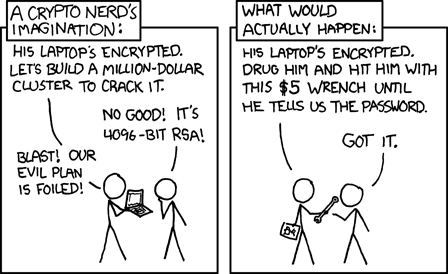
The $5 wrench problem, via xkcd 538 (CC BY-NC 2.5). - Running without a passphrase. Encryption is optional. A vault run without a passphrase has no confidentiality guarantee against its storage provider, and the protections above that depend on encryption don't apply. Leaving it optional is deliberate. We don't believe in locking you into our app: your content is yours, and being able to keep it unencrypted, or decrypt and export what you've stored, is what lets you leave for another app whenever you want. You own your data, full stop.
- Deliberately sharing or saving a file elsewhere. Saving to your camera roll or sharing to another app hands over an unencrypted copy by design; Media Den labels that choice clearly rather than hiding it, but it can't protect a copy once it's outside the vault.
- Metadata stripping is not complete for every field. The metadata viewer lets you inspect what remains after stripping so you can judge that for yourself rather than take it on faith.
Where this leaves you
Media Den is built so that a stolen phone, a forensic keychain dump, a subpoenaed cloud provider, or a restored backup on someone else's hardware each come up empty. We've gone to these lengths because we believe privacy is a human right.